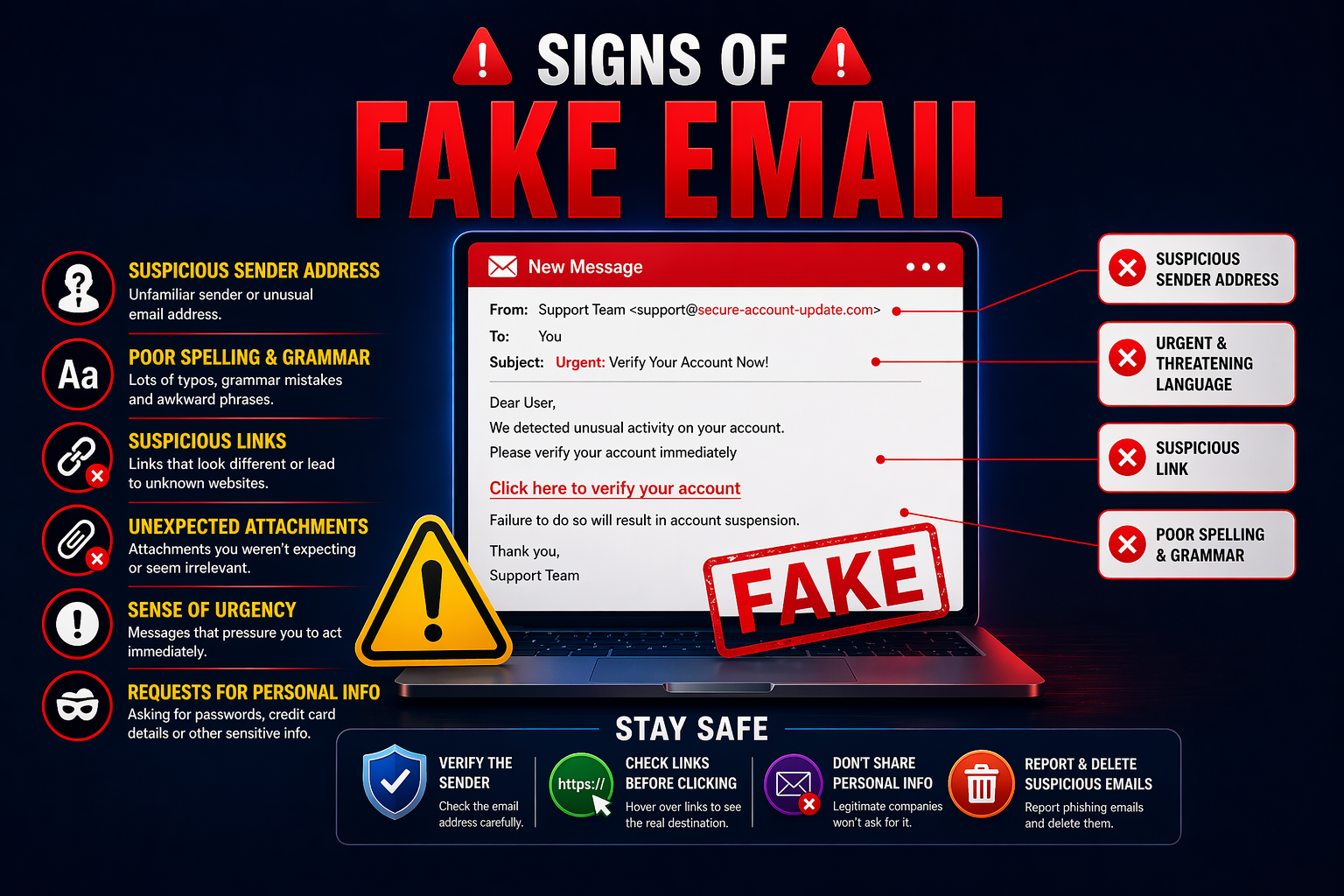
Every day, billions of emails are sent around the world. But not all of them are real.
Fake email addresses are being used to send scam messages, steal personal information, spread viruses, and trick innocent people. The scary part? Many of these fake emails look completely normal at first glance.
The good news is fake email addresses almost always leave clues. Once you know what to look for, you can spot them in seconds.
In this blog, we’ll walk you through every common sign of a fake email address that you should never ignore. We’ll also show you exactly how to protect yourself.
Why Do People Use Fake Email Addresses?
Before we talk about the signs, let’s understand why someone would use a fake email address in the first place.
There are two types of people who use fake or disposable emails:
Legitimate users — people who want to protect their privacy, avoid spam, or test websites. Services like Zeptempmail exist for exactly this purpose. This is completely legal and ethical.
Bad actors — scammers, spammers, and hackers who use fake emails to hide their identity while committing fraud, phishing, or harassment.
The problem is that both types of users can look the same from the outside. That’s why knowing the signs of a fake email address is so important — whether you’re an individual checking your inbox or a business verifying user sign-ups.
Sign #1 — The Domain Name Looks Suspicious
The domain is the part that comes after the “@” symbol. For example, in “support@amazon.com,” the domain is “amazon.com.”
Real companies always use their official domain. Scammers can’t use the real domain, so they create something that looks similar.
Watch out for:
- Extra words added: amazon-support@amazon-helpdesk.com
- Misspelled names: support@amaz0n.com or support@arnazon.com
- Random numbers: info@amazon123.com
- Wrong domain extension: support@amazon.org instead of .com
One small letter difference can be very easy to miss—especially on a mobile screen. Always read the full email address carefully, not just the display name.
Sign #2 — The Display Name Doesn’t Match the Email Address
This is one of the most common tricks scammers use — and it works because most people only look at the name, not the actual address.
An email can show any display name the sender wants. So a scammer can set their display name to “PayPal Support,” but their actual email address is something like randomguy123@gmail.com.
How to check:
- On desktop: click on the sender’s name—the full email address will appear
- On mobile: Tap the sender’s name to expand the full address.
- Never trust just the display name.
If the display name says one thing and the email address says something completely different — that is a very strong sign of a fake email.
Sign #3 — It Uses a Free Email Service for Official Communication
Legitimate businesses and organizations always use their own domain for official communication. They would never send important emails from a free service like Gmail, Yahoo, or Hotmail.
Red flags:
- support@gmail.com claiming to be from your bank
- helpdesk@yahoo.com claiming to be from Amazon
- noreply@hotmail.com claiming to be from a government department
Real companies spend money on their domain and use emails like support@companyname.com. If any “official” email comes from a free provider, treat it as suspicious immediately.
Sign #4 — The Email Address Has Random Numbers or Characters
Real people and real businesses use clean, professional email addresses. Fake or auto-generated email addresses often contain random strings of numbers and letters.
Examples of suspicious addresses:
These kinds of addresses are usually generated automatically by bots or throwaway email services used for spam or scam purposes.
If you receive an email from an address like this — especially one asking for personal information or money — do not respond.
Sign #5 — The Email Comes from a Known Temporary Email Domain
There are hundreds of well-known temporary email domains out there. Scammers and bots frequently use these disposable services to create throwaway addresses for fraudulent activity.
Common temporary email domains used for abuse:
Important note: Not everyone using a temporary email is a scammer. Many honest users use services like temp-mail.org for completely legitimate privacy reasons—like avoiding spam or testing websites.
However, if your business is receiving sign-ups or contact form submissions from these addresses, it’s smart to verify them. Use an email detector tool to check if an incoming email is from a temporary or disposable source.
Sign #6 — The Email Address Is Unusually Long or Complicated
Most real email addresses are short and easy to remember. Fake, auto-generated, or bot-created addresses are often very long and hard to read.
Compare these:
A very long and complicated email address — especially one with no logical structure — is a strong sign that it was automatically created, not by a real person.
Sign #7 — The Domain Was Registered Very Recently
Scammers often create brand new domains that look similar to real company websites. These domains are registered just days or weeks before the scam begins.
How to check:
- Use a free WHOIS lookup tool (like whois.domaintools.com)
- Enter the domain from the suspicious email
- Check the “Registration Date”
- If the domain is only a few days or weeks old—be very careful.
A brand new domain pretending to be an established company is almost always a scam.
Sign #8 — No Professional Signature or Contact Information
Real emails from real people or businesses almost always have a proper email signature at the bottom. This usually includes:
- Full name
- Job title
- Company name
- Phone number
- Official website
Fake emails often have no signature at all — or a very vague one like just a first name. If an email claiming to be from a company has zero contact information, that’s a major red flag.
Sign #9 — The Email Asks You to Reply to a Different Address
This is a clever trick. The email appears to come from one address, but when you hit “Reply,” it goes to a completely different address.
Scammers do this to control where your response goes. The original address might look legitimate, but your reply goes to their real, anonymous inbox.
How to check:
- Before replying, look for a “Reply-To” field in the email headers.
- If the reply-to address is different from the sender address—be suspicious
Sign #10 — The Email Fails Authentication Checks
Every legitimate email goes through authentication systems that verify the sender is who they claim to be. These systems are called SPF, DKIM, and DMARC.
Most modern email clients (like Gmail) run these checks automatically. If an email fails these checks, Gmail may show a warning like “This email could not be verified” or place the email in spam automatically.
What to look for:
- A warning banner at the top of the email
- The email landing directly in your spam/junk folder
- A question mark or warning icon next to the sender’s name
If you see any of these, the email has likely failed authentication and is probably fake.
Quick Reference — All Warning Signs at a Glance
| Sign | What It Looks Like | Risk Level |
|---|---|---|
| Suspicious domain name | amazon-helpdesk.net | 🔴 Very High |
| Display name mismatch | Name says “PayPal” but email is random Gmail | 🔴 Very High |
| Free email for official use | support@gmail.com from a “bank” | 🔴 Very High |
| Random numbers in address | xk8291hd@mail.com | 🟠 High |
| Known temp email domain | @mailinator.com | 🟠 High |
| Unusually long address | john28374920abc@domain.com | 🟡 Medium |
| Newly registered domain | Domain created last week | 🔴 Very High |
| No signature or contact info | No name, phone, or company info | 🟠 High |
| Reply-to is different address | Sender ≠ Reply address | 🔴 Very High |
| Failed email authentication | Warning banner shown in Gmail | 🔴 Very High |
How to Verify a Suspicious Email Address
If you’re not sure whether an email is real or fake, here’s a simple step-by-step process:
Step 1—Read the full email address carefully. Don’t just look at the display name. Click or tap on the sender to reveal the real address.
Step 2 — Check the domain Is it the company’s official domain? Search for the company online and compare their official contact email.
Step 3—Use an Email Detector Tool Our Email Detector Tool at ZeptempMail helps you quickly identify whether an email address is from a temporary, disposable, or suspicious source. It’s free and instant.
Step 4 — Check WHOIS for the domain Go to a free WHOIS lookup site and check when the domain was registered. A brand-new domain from a “big company” is a scam.
Step 5 — Look at email headers In Gmail, click the three dots on an email and select “Show original.” This shows the full technical details, including whether it passed authentication.
Step 6 — When in doubt, don’t click. If anything feels off, don’t click any links or download any attachments. Go directly to the company’s official website instead.
Protecting Your Business from Fake Email Sign-Ups
If you run a website or online business, fake email addresses can be a serious problem. Bots and scammers sign up with fake emails to do the following:
- Abuse free trial offers
- Create fake accounts
- Skip email verification
- Spam your platform
To protect your business, consider adding email verification to your sign-up forms. You can also use tools to detect temporary or disposable email addresses at the point of entry.
And if you’re a developer testing your own email system, using a legitimate disposable email service like Zeptemp Mail is a clean and safe way to do it—without polluting your real inbox.
Bonus Tip — Protect Your Own Identity Too
Just like you check incoming emails carefully, you should also protect your own email address from being exposed to the wrong hands.
When you sign up for random websites, newsletters, or apps you’re not sure about—don’t use your real email. Instead, use a temporary email from Temp Mail to keep your real inbox clean and safe from spam and scammers.
And for extra anonymity, pair it with a unique username created using our Username Generator Tool—so your identity across different websites can never be connected or tracked.
Frequently Asked Questions (FAQs)
❓ How can I tell if an email address is fake?
Look for these signs: suspicious or misspelled domain, display name that doesn’t match the actual address, use of free email services for official communication, random numbers in the address, and failed authentication warnings in your inbox.
❓ Can a fake email look exactly like a real one?
Almost — but not completely. Scammers can copy the display name and email design, but they cannot use the exact official domain of a real company. Look closely at the domain after the “@” symbol—even one character difference means it’s fake.
❓ What is email spoofing?
Email spoofing is when a scammer manipulates the “From” field of an email to make it look like it came from a trusted sender. The display name looks real, but the actual email address is different. Always check the real address, not just the name.
❓ Is using a temporary email address illegal?
No. Using a temporary email for privacy, spam avoidance, or website testing is completely legal. Services like Zeptempmail are designed for legitimate personal use. The problem only arises when someone uses any email — real or fake — for fraudulent or illegal purposes.
❓ How do I check if an email domain is new or old?
Use a free WHOIS lookup tool. Enter the domain name and look for the “Registration Date.” If the domain was created recently but the email claims to be from an established company—it is almost certainly a scam.
❓ What should I do if I receive a suspicious email?
Do not click any links or open attachments. Check the full sender address carefully. Report it as spam or phishing in your email client. If it claims to be from a company you use, contact that company directly through their official website.
❓ Can businesses block fake email sign-ups?
Yes. Businesses can use email verification APIs and email detector tools to block disposable or fake email addresses at the point of sign-up. This reduces fake accounts, abuse, and bot registrations significantly.
❓ What is the difference between a fake email and a temporary email?
A fake email is usually a spoofed or fraudulent address used to deceive someone. A temporary email is a real, working disposable address used for short-term privacy purposes. Temporary emails from services like Zeptempmail are legitimate tools—fake emails are used for deception.
Final Thoughts
Fake email addresses are everywhere — but they always leave signs. Once you know what to look for, spotting them becomes second nature.
Always remember:
- 🔍 Check the full sender address — not just the display name
- 🌐 Verify the domain is official and not newly created
- ⚠️ Watch for authentication warnings in your inbox.
- 🛠️ Use an email detector tool when in doubt
- 📧 Protect your own email by using a temporary address for nonessential sign-ups
- 👤 Stay anonymous with a unique username from our Username Generator
The internet is a safer place when you know the rules. Stay alert, stay smart, and stay protected.
Also read: